KOSHTER icon
Business · Android

KOSHTER

Now recruiting testers

Invoices, estimates and quotes, right from your phone

Pick a client, add items from your price list, and KOSHTER builds an invoice, estimate, quotation or completion certificate as a PDF. No account. Everything stays on your phone.

Free · Android · via Google Play

Category
Business
Price
Free + Pro
Languages
8 languages
KOSHTER — Estimate. Invoice. Send.
00Closed testing

Try KOSHTER before the official release

We are recruiting testers for the Android version. Use KOSHTER for real work, share feedback and help us make the app better.

  • Early accessNew versions reach you before the public release.
  • FreeTaking part costs nothing and needs no subscription.
  • Real influenceThe team reads your feedback and acts on it in the next updates.

How to join

  1. Step 1

    Join the group

    Join the RE:RISE testers Google Group with the same Google account you use in Google Play.

    Join the group
  2. Step 2

    Confirm participation

    Open the Google Play testing page and tap “Become a tester”.

    Confirm participation
  3. Step 3

    Install the app

    Once confirmed, open Google Play and install the test version. Access may take a little while to appear.

    Install the app

You need an Android phone and a Google account — the same one in all three steps. A test version may contain bugs.

Questions about testing

What do I need to become a KOSHTER tester?

An Android phone and a Google account. Use the same account in all three steps: in the testers group, on the Google Play testing page and in Google Play on your phone.

Is testing KOSHTER free?

Yes. Closed testing is free: you install KOSHTER from Google Play like any other app and get updates earlier. We don't promise paid perks for taking part — just early access and a say in how the app develops.

Can I leave the test?

Yes, at any time. Open the testing page play.google.com/apps/testing/systems.rerise.koshter and leave the program, or leave the testers group. You can then uninstall the app or wait for the public version.

What data does the developer see?

The developer can see the email address of the Google account you used to join the group and the test (it is shown in Google Play Console), plus any feedback you send. How the app handles data on your phone is described in its privacy policy.

Why can't I find or install KOSHTER on Google Play?

During closed testing the app is available only to test participants. Make sure the group, the testing page and Google Play on your phone all use the same Google account, and give it a little time — access sometimes takes a while.

Can I lose data in the test version?

It is a test version, so bugs are possible. For important data make a backup or export if the app supports it.

01Made for

Who KOSHTER is for

Estimate. Invoice. Send.

  • Sole traders and the self-employed, including Ukrainian FOPs, who invoice clients
  • Tradespeople in repairs, installation and on-site services
  • Small service businesses that send estimates and quotations
  • Anyone with clients abroad: documents in 8 languages and 22 currencies
  • People who would rather handle paperwork on a phone than a computer
02Features
KOSHTER — An invoice in a few tapsKOSHTER — A clean A4 PDFKOSHTER — Estimates for labour and materials
KOSHTER — Quotations and completion certificatesKOSHTER — Your price list in your pocketKOSHTER — Clients with their details
KOSHTER — Costs only you can seeKOSHTER — See what you actually earnedKOSHTER — Invoices in your client’s language
03Data, price, languages

Your data stays on your phone

KOSHTER works without sign-up or an account. Your business details, clients, price list, documents and costs are stored only on the device: there is no server of ours, no ads and no analytics. A document leaves the phone only when you share, print or save it yourself. You create backups yourself and can protect them with a password.

Privacy policy

Free and Pro

  • Free: unlimited invoices and estimates, price list and clients, PDF, PNG, printing, backup, the Classic template.
  • KOSHTER Pro is a one-time purchase in Google Play, not a subscription.
  • Pro adds quotations, completion certificates, Clean and Signature templates with an accent colour, profit analytics and document packages from one order.
  • Google Play shows the Pro price in your currency. Restore it on the same Google account, with no KOSHTER account needed.
04FAQ

Frequently asked questions

Didn't find an answer? Write to us and we'll reply personally.

Write to us
How do I send an invoice from my phone?

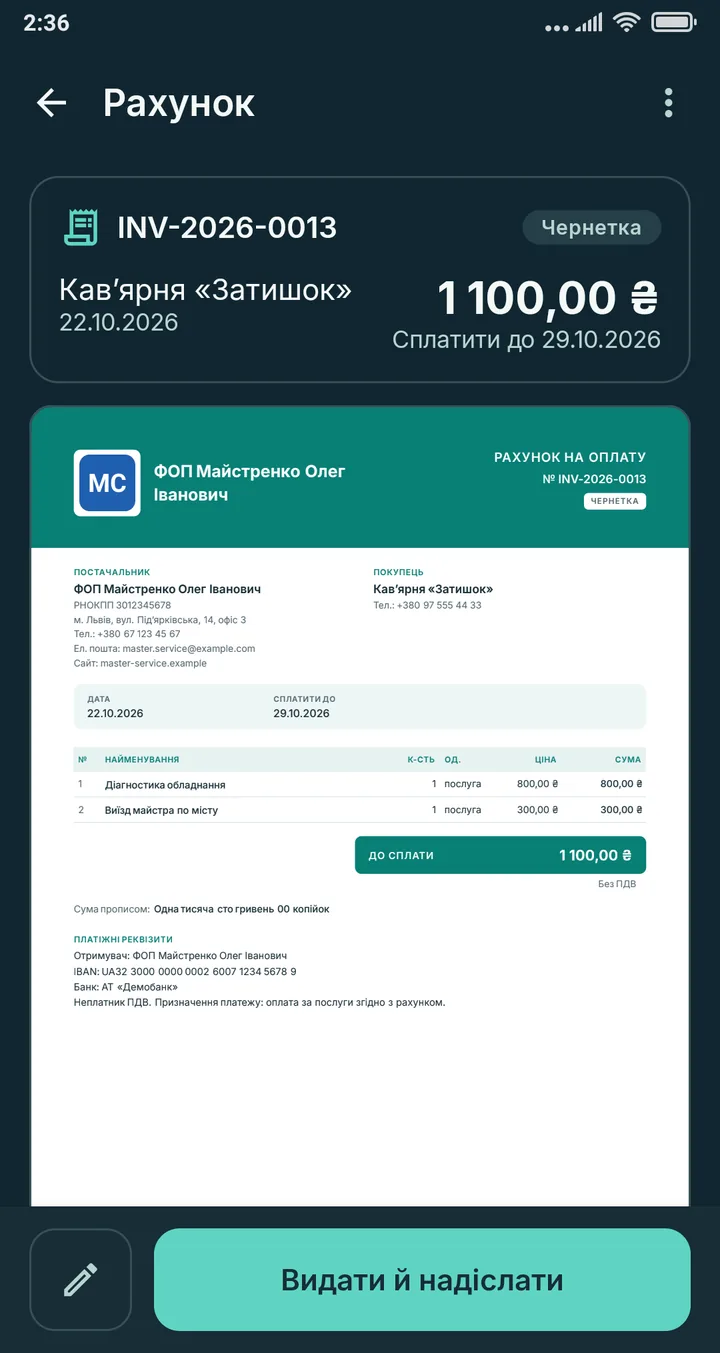
Tap Invoice, pick a client or add a new one, and add items from your price list or by hand. The total due stays on screen. Tap Issue and send: KOSHTER creates the PDF and opens the standard Android share menu, so you can send it by messenger or email, print it or save it to a file.

Is KOSHTER free?

Invoices and estimates are free and unlimited, with no ads. KOSHTER Pro unlocks quotations, completion certificates, branded templates and profit analytics. It is a one-time purchase, not a subscription; Google Play shows the price in your currency.

Is it a fiscal cash register or accounting software?

No. KOSHTER is not a fiscal cash register, does not issue fiscal receipts and does not replace accounting. It creates invoices, estimates, quotations and completion certificates that you send to your clients.

Can I create a completion certificate on my phone?

Yes, with KOSHTER Pro. It includes the parties, place and date, the work done, the total, the amount in words and blank lines for signatures and names. It counts as signed only when you mark it so. You can create it from an invoice or estimate in the same order.

Does it work offline?

Yes. Documents, the price list and clients work without a connection. The internet is needed only by Google Play to buy or restore Pro, and by whichever app you use to send the file.

Where is my data stored?

Only on your phone, in the app’s private storage. Android’s automatic cloud backup is turned off for KOSHTER. You create backups yourself and keep them wherever you like, for example Google Drive, optionally encrypted with a password.

Can I invoice clients in other countries?

Yes. A document can be issued in any of 8 languages: Ukrainian, English, Polish, German, Czech, Spanish, Italian or French. In settings you tick your currencies out of 22, and only those are offered in documents.

Can I hide my costs from the client?

Yes. Internal costs and cost prices are stored for your own profit calculation. They are never added to the invoice total and never printed on the client’s document.

Questions about KOSHTER?

Ideas, partnership, beta testing — write to us and we will reply.

Write to us
KOSHTERNow recruiting testersBecome a tester